When recording longer videos using GoPro cameras, battery life can quickly deplete. However, GoPro cameras (Hero 8 Black onwards) can be charged while recording. To extend the battery life for temporary installations, USB battery banks can be mounted with the camera, or for permanent installations, we recommend wiring into the vehicle’s electricity supply.
For the Hero 7 Black and older which use an external mounting frame, this will require charging door removal. Below is a video walk through.
Storage Capacity
Another common problem with recording longer videos is the file size. Unless 4K and/or 60FPS is specifically required, we recommend recording at 1080p (Full-HD, 1920x1080) at 30FPS (frames per second). This keeps the file size manageable for long recordings, compared to 4K or 60FPS videos, which would consume significantly more storage per second of video.
1080p @ 30FPS = 30Mbit/s (3.75 Mbytes/s).
This equates to 17 minutes of video per 4GB chapter.
Approximate Recording Times
microSD Card Size
Approximate Recording Time
16GB
2 hours
32GB
4 hours
64GB
8 hours
128GB
16 hours
Storage Media Recommendations
Ensure you use a microSD card from a trusted brand (e.g. SanDisk, Lexar or Samsung) to minimise the chance of corrupted or lost data, or the camera freezing up. GoPro maintains an up-to-date list of recommended storage cards, found here.
Model
Maximum Storage Capacity
Hero 10 Black and newer
1TB
Hero 9 Black and older
Up to 512GB
microSD Card Storage Capacity
Format As…
32GB and below
FAT32
64GB and above
exFAT
Camera Temperature Regulation
Our testing showed that GoPro cameras run relatively hot when recording continuously.
When mounting the camera inside a vehicle, aim to keep the camera out of direct sunlight.
Alternatively, mounting the camera outside of the vehicle will create enough airflow when driving to keep the camera cool. This will reduce the likelihood of the camera becoming unresponsive or shutting down due to overheating.
Post-Processing the Data
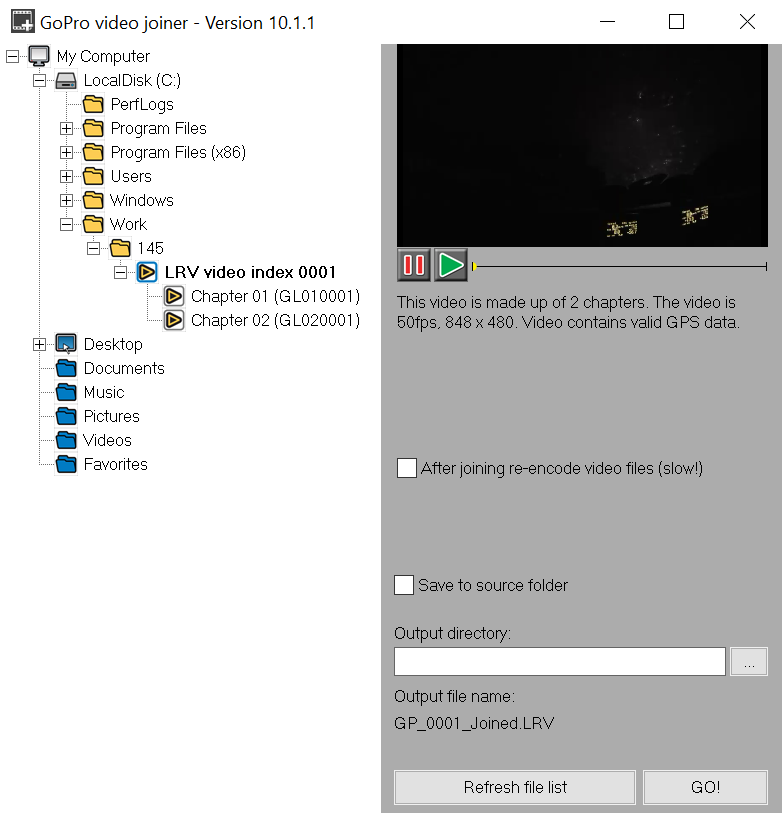
Before loading the files into Analysis, it is recommended to join the video chapter files into a single video file using the Race Technology Video Joiner, supplied with both the Race Technology Full V10 and GoPro-Only software packages, which keeps the GPS data intact. The RT Video Joiner software can handle both MP4s and LRVs.
Before joining videos, use the video preview window to establish any unwanted chapters and delete these chapters in a File Explorer window. Ensure that you then refresh the Video Joiner file tree once these files have been deleted.
LRV videos also contain the full stream of GPS data recorded: using these files be faster to process than MP4s, while still providing the same GPS data accuracy. For more information, see Compatible Recording Modes.
 My basket |
Checkout |
Add to email list
My basket |
Checkout |
Add to email list




 Edit
Edit History
 Print
Print Download (.HTML)
 PDF
PDF